

SOLO Manual
SOLO: The Ultimate World Synth
Unleash your creative potential and embark on a sonic journey like no other with SOLO, the cutting-edge virtual instrument plugin designed to transport your music to new horizons.
Featuring a unique blend of hybrid synthesis, microtonal scales, and world music sounds, SOLO is the ultimate tool for composers, producers, and musicians seeking to infuse their compositions with captivating global flavors.
SOLO is designed to allow you to easily explore presets, fine-tune sounds, tweak playbility, implement intricate modulations, or venture into the realm of microtonal scales. Collaborating with musicians and producers worldwide, we have carefully curated a unique library of authentic sounds to help you stand apart from the crowd. Moreover, for those seeking even greater customization, SOLO allows you to import your own Korg KMP or SoundFont multi-samples, inviting you to explore new sonic frontiers and infuse your music with a unique personal touch. With SOLO, the possibilities are limitless, and your creative expression knows no bounds.
Getting Started
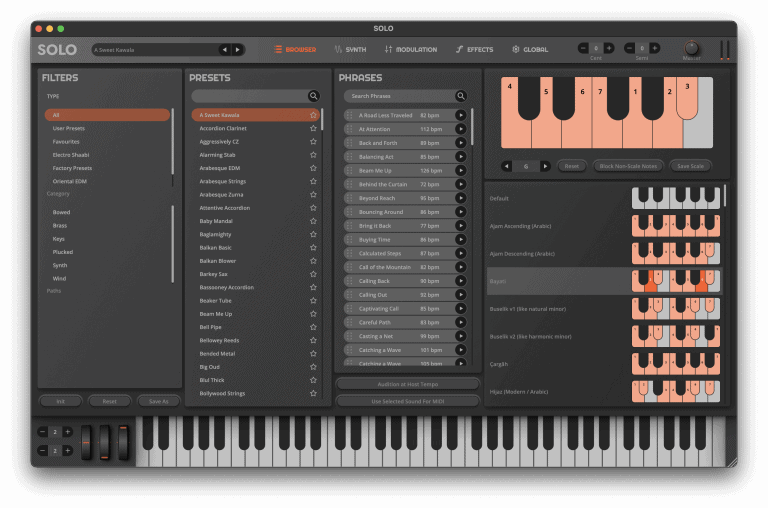
SOLO brings your music to life with its versatile sound engine, featuring 3 oscillators that incorporate multiple synthesis techniques, modeled filters, powerful modulation options, and support for microtonal scales and MPE compatibility. The integrated effects suite further enhances your sound, delivering a truly distinctive sonic experience.
The plugin is organized into five main pages: Browser, Synth, Control, FX, and Global, giving you streamlined access to all key features.
The intuitive main interface allows for seamless navigation through presets, quick access to different pages, precise tuning adjustments in both cents and semitones, and control over master output levels.
Installing SOLO
To install SOLO, first download and install the new TAQS.IM Hub application that now manages the installation and activation of SOLO and it’s expansion packs.
Please download and install the appropriate version below. Once installed, login to your TAQS.IM account within Hub and install the respective software and expansion packs you have purchased on your account.
Mac Alternate Download: https://taqs.im/hub-mac-alt (WeTransfer Link)
Windows Alternate Download: https://taqs.im/hub-win-alt (WeTransfer Link)
Note: You may receive a Windows Defender Notice during installation
Using the Plugin Version
To use SOLO as a plugin, it must be loaded into a DAW that supports VST, AU, or AAX formats. The Windows VST3 version is installed at C:\Program Files\Common Files\VST3\SOLO.vst3
Load the Plugin:
Open your DAW and insert SOLO as a virtual instrument within a track.
Set Up MIDI Input:
Ensure the track is set to send MIDI data to SOLO so it can receive input and output sound correctly.
Select Sounds:
Once MIDI is configured, explore SOLO’s sound library by selecting a Category from the left-hand panel, followed by a Preset to start playing.
Using the Standalone Version
The standalone version of SOLO lets you play the virtual instrument independently, without requiring a DAW. Before getting started, ensure you have a connected MIDI controller and an audio interface capable of low-latency performance.
Configure Audio/MIDI Settings:
Click the Options button at the top of the interface, then select Audio/MIDI Settings. This will open a dialog box where you can choose your desired audio output, adjust the sample rate, and set the audio buffer size for optimal performance.
Select Your MIDI Controller:
Use the Active MIDI Input section to choose your MIDI controller. If you’re using a Bluetooth MIDI controller, click the Bluetooth MIDI button and select the appropriate device.
Finalize Settings and Play:
After configuring your Audio/MIDI settings, close the dialog box. You can now start playing by selecting a Category from the left-hand panel, then choosing a Preset to begin exploring SOLO’s sound palette.
Browser Page
The Browser Page brings together powerful tools for managing presets, handling MIDI phrases, and implementing microtonal scales—all within a single, intuitive interface.
Presets Section
Easily browse through all available presets in the Presets section. You can now mark your favorite presets by clicking the star icon on the right. Use the Save As button to save your custom sounds, revert to the original settings, or initialize a new sound from scratch.
Type Filter: Narrow down your search by selecting specific preset types—whether it’s factory presets, user-created presets, category-specific sounds, or your marked favorites.
Phrases Section
The Phrases section allows you to explore and use MIDI phrases designed in various scales. Click the play button to preview a phrase, then drag and drop it directly into your session. These phrases can sync to your DAW’s tempo or be auditioned with a different preset for creative experimentation.
Scale Section
The Scale section lets you dive into microtuning within the standard 12-note scale. Click a note to set it to the default detuning of -50 cents, then click and drag to fine-tune it to your preference. You can also select from a list of popular scales, adjust the root note, block out notes outside of the selected scale, or save your custom scales.
Scale Converter Controls:
- Scale: Adjust the detuning (in cents) for each individual note.
- Scale Select: Choose from a collection of preset scales.
- Root: Set the root note to transpose the selected scale.
- Reset: Restore the scale to its default settings.
This comprehensive toolset allows you to infuse your sound with unique tuning characteristics, making your compositions stand out.
Synth Page

The Synth page provides full access to SOLO’s powerful sound engine, allowing you to dive deep into sound design using a blend of oscillators, filters, and modulation options.
Oscillators Section
SOLO features three versatile oscillators that can utilize virtual analog-style waveforms, sample playback, or phase distortion. Each oscillator includes a wide range of independent controls for fine-tuning your sound.
Sample Oscillator Controls
- Sample Category: Choose a sample category.
- Sample: Select the specific sample to use.
- Semi (Semitone): Adjust the pitch by semitones.
- Cent (Cents): Fine-tune pitch in cents.
- Low Cut / High Cut: Apply EQ to cut low or high frequencies.
- Pan: Adjust stereo panning.
- X-Fade Att MS: Adjust the attack time of the audio when transitioning through samples.
- X-Fade Rel MS: Adjust the release time of the audio when transitioning through samples.
- X-Fade Type: Adjust the interpolation type of the samples.
- Loop X-Fade MS: Adjust the amount of time to transition between samples when looping.
- Level: Control the volume level.
- Vel Min / Vel Max: Set the velocity range for playback.
- Note Min / Note Max: Define the MIDI note range.
- Delay Start: Set a delay (in ms) before the oscillator starts playing.
Virtual Analog Oscillator Controls
- Oscillator Type: Choose from SAW, TRI (Triangle), or SIN (Sine).
- Sync: Sync oscillators 2 and 3 to oscillator 1.
- Pulse Width (PW): Adjust pulse width modulation rate.
- Pulse Magnitude (PM): Control the intensity of pulse width modulation.
- Noise: Set the noise level.
- Semi / Cent: Adjust pitch in semitones and cents.
- Low Cut / High Cut: Apply EQ to cut low or high frequencies.
- Pan: Adjust stereo panning.
- Level: Control the volume level.
- Vel Min / Vel Max: Set the velocity range for playback.
- Note Min / Note Max: Define the MIDI note range.
- Delay Start: Set a delay (in ms) before the oscillator starts playing.
Phase Distortion Oscillator Controls
- Oscillator Row 1 & Row 2: Select from Saw, Square, Double Sine, Pulse, Resonant Saw, or Resonant Tri waveforms.
- PD Phase: Adjust the phase of the waveform.
- Filter Envelope: Control the influence of the filter envelope.
- Semi / Cent: Adjust pitch.
- Low Cut / High Cut: Apply EQ to cut low or high frequencies.
- Pan: Adjust stereo panning.
- Level: Control the volume level.
- Vel Min / Vel Max: Set the velocity range for playback.
- Note Min / Note Max: Define the MIDI note range.
- Delay Start: Set a delay (in ms) before the oscillator starts playing.
Filter Section
Shape your sound using Moog-style ladder filters or Oberheim-style filters for rich, analog-inspired tones.
- Filter Type: Choose between:
- 12DB: Moog-style -12dB ladder filter
- 24DB: Moog-style -24dB ladder filter
- Drive: TB-303 Style filter
- Env Trigger: Adjust the envelope trigger type to Trigger Default, Trigger Start, Trigger Position, Trigger First
- Cutoff: Adjust the filter cutoff frequency.
- Resonance: Set the resonance for emphasis at the cutoff point.
- Drive: Adjust the amount of drive into the filter
- Env Amount: Control how much the envelope affects the filter.
- Key Track: Adjust the filter’s response to keyboard tracking.
- Attack, Decay, Sustain, Release: Shape the filter envelope.
- Curve: Adjust the shape of the envelope
Voices Section
Adjust the voicing options to control how SOLO responds to your playing style.
- Poly / Mono / Legato: Select between polyphonic, monophonic, or legato modes.
- Low / Last / High: Set note priority for Mono/Legato modes.
- Unison: Increase the number of voices in unison.
- Unison Detune: Detune unison voices for a thicker sound.
- Unison Spread: Widen the stereo spread of unison voices.
Amplitude Section
Control the volume dynamics with a traditional ADSR envelope for each oscillator.
- Attack: Set the attack time.
- Decay: Adjust the decay time.
- Sustain: Control the sustain level.
- Release: Adjust the release time.
- Env Trigger: Adjust the envelope trigger type to Trigger Default, Trigger Start, Trigger Position, Trigger First
- Curve: Adjust the shape of the envelope
Glide Section
Fine-tune the pitch glide between notes for smooth transitions.
- Glide Length: Set the duration of the glide effect per oscillator (or sync them together).
- Glide Curve: Shape how the glide progresses over time.
- Glide by Velocity: Influence glide length based on velocity.
- Const Rate / Const Time: Set the glide to have a constant rate or time.
- Max Glide ST: The maximum number of semitones that will glide
- Fast Play Threshold: The threshold where the fast play glide will be applied
- Fast Glide Length: The length of the fast glide
- Absolute Minimum Glide: The minimum amount of glide that will always be applied
- Always Glide: Enable continuous glide between all notes.
This comprehensive set of features allows you to craft unique and dynamic sounds, making SOLO a versatile tool for producers, composers, and sound designers alike. wB
Modulation Page
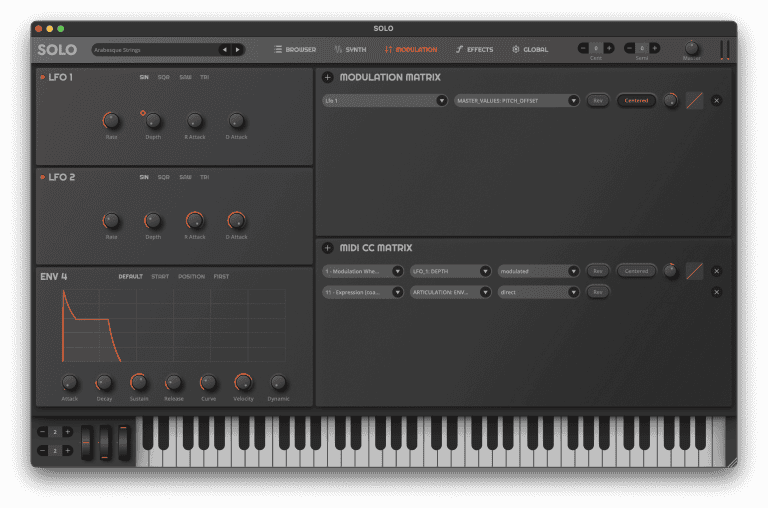
The Modulation Page in SOLO offers extensive control over how sounds are played and modulated, giving you the flexibility to shape your sound in detailed ways. This section includes powerful tools such as LFOs, controllers, a modulation matrix, and a MIDI CC matrix.
LFO Section
Take advantage of two Low-Frequency Oscillators (LFOs) within the modulation matrix to add movement and depth to your sound. Each LFO includes the following controls:
- Waveform Type: Choose from SIN (Sine), SQR (Square), SAW, or TRI (Triangle) waveforms.
- Rate: Set the speed of the LFO.
- R Attack: Control the attack time of the LFO rate.
- Depth: Adjust the intensity of the LFO effect.
- D Attack: Control the attack time of the LFO depth.
Env4 Section
Take advantage of an additional envelope that can be used in the modulation matrix to add movement and depth to your sound. The Env4 includes the following controls:
- Attack: Set the attack time.
- Decay: Adjust the decay time.
- Sustain: Control the sustain level.
- Release: Adjust the release time.
- Env Trigger: Adjust the envelope trigger type to Trigger Default, Trigger Start, Trigger Position, Trigger First
- Curve: Adjust the shape of the envelope
Controllers Section
Fine-tune modulation and pitch bend parameters for expressive performance control.
- Vel CC: Enable velocity sensitivity for dynamic response.
- PB Up / PB Down: Set the pitch bend range in semitones for upward and downward bends.
- Velocity Curve: Adjust the velocity response curve.
- Velocity Sensitivity: Control how much velocity affects volume.
Modulation Matrix
Harness the power of the flexible Modulation Matrix to create complex modulation routes, linking various sources to target parameters.
- Source: Choose the modulation source (e.g., LFO, envelope).
- Modifier: Select the parameter to be modulated.
- Rev: Reverse how modulation is affected
- Centered: Center where the modulation is applied
- Amount: Set the intensity of the modulation effect.
- Curve: Define the modulation curve for smooth or stepped effects.
- Add / Remove: Add or remove modulation routes as needed.
MIDI CC Matrix
Map MIDI CC commands to modulate different parameters, enabling customized control using your MIDI controller.
- Source: Select the MIDI CC value as the source.
- Modifier: Choose the parameter to modulate.
- Amount: Define the modulation intensity.
- Curve: Set the response curve for the modulation.
- Add / Remove: Add or remove MIDI CC mappings.
The Control Page offers a robust set of tools to fully customize how SOLO responds to your playing style, making it a versatile instrument for both studio production and live performance.
Effects Page

The Effects Page in SOLO offers a suite of studio-quality effects to enhance and sculpt your sound. With built-in EQ, Distortion, Phaser, Delay, and Reverb modules, you can add depth, texture, and character to your compositions.
Distortion
Add warmth and edge to your sound using the distortion controls:
- In Gain: Adjust the input gain level.
- Out Gain: Control the output gain level.
- Sat: Set the amount of saturation for added harmonics.
- Tone: Shape the tonal character of the distortion.
Phaser
Create swirling, sweeping effects with the phaser:
- Depth: Adjust the depth of the phasing effect.
- Rate: Control the speed of the phaser’s oscillation.
- Intensity: Set the strength of the phasing effect.
- Sync: Synchronize the phaser rate to your DAW’s BPM.
Delay
Add space and rhythmic echoes using the delay controls:
- Low Cut / High Cut: Apply filters to shape the delay signal.
- Mix: Control the wet/dry mix of the delay effect.
- Rate: Set the time interval between echoes.
- Feedback: Adjust the number of repeats for the delay.
- Sync: Sync the delay rate with your DAW’s BPM.
Reverb
Create a sense of space and depth with the reverb module:
- Low Cut / High Cut: Apply filters to shape the reverb signal.
- Feedback: Adjust the perceived size of the reverb space.
- Width: Control the stereo spread of the reverb.
- Damping: Set the amount of high-frequency damping for a softer reverb tail.
- MS Pre Delay: Adjust the Pre Delay of the reverb.
- Mix: Balance the dry and wet reverb signals.
By leveraging the FX Page, you can refine your sound, adding everything from subtle enhancements to dramatic transformations, ensuring your music stands out in any mix D
Global Page
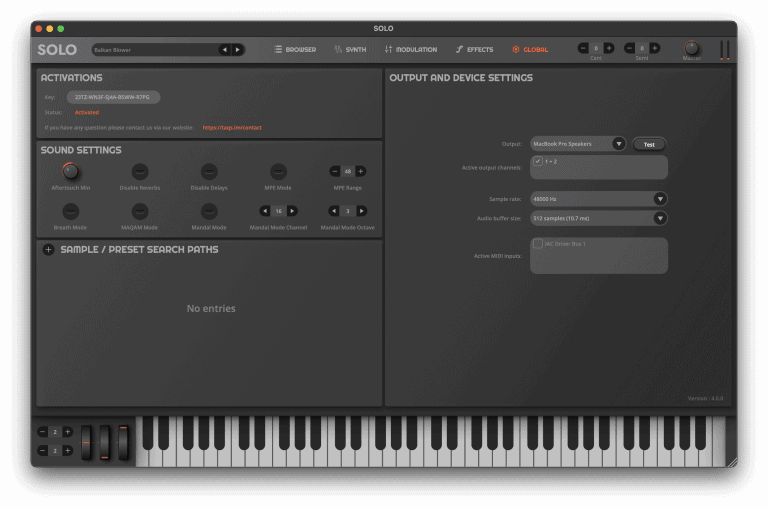
The Global Page provides centralized control for license management, sound settings, sample/preset search paths, and output configurations, allowing you to optimize SOLO to fit your workflow.
Activations
Manage your SOLO license activations efficiently.
- Key: Displays the active license key for your SOLO instance.
- Remaining Activations: Shows how many additional devices can be activated.
Sound Settings
Adjust global sound parameters to tailor your performance.
- Aftertouch Min: Set the minimum threshold for aftertouch sensitivity.
- MPE Mode: Enable compatibility with MPE (MIDI Polyphonic Expression) devices.
- MPE Range: Define the number of semitones MPE covers.
- Disable Reverbs: Globally disable all reverb effects.
- Disable Delays: Globally disable all delay effects.
- MAQAM Mode: Enable compatibility with the Mazeeka Toys MAQAM Controller.
- Mandal Mode: Activate to assign an octave on your MIDI controller for toggling microtuning per note.
- Mandal Mode Octave: Specify which octave is used for Mandal Mode.
Sample / Preset Search Paths
Import external samples to expand your sound palette using SFZ, SoundFont, or Korg KMP files.
- Navigate to the Global tab.
- Click the “+” next to Sample/Preset Search Path.
- Select the folder containing your samples and click Open.
- Close the window.
A new category will appear under each Wave Oscillator, named after the folder you added. You can now access and use the imported wave samples as oscillators.
Output Settings
Configure global output settings for the standalone version of SOLO.
- Output: Choose your preferred audio output device.
- Active Output Channels: Select the output channels to use.
- Sample Rate: Set the desired sample rate for optimal audio quality.
- Audio Buffer Size: Adjust the buffer size to manage latency.
- Active MIDI Input: Select the MIDI input device for standalone mode.
The Global Page ensures that SOLO is fully customized to your setup, giving you control over how it interacts with your hardware and software environment
Release Notes
Below is the list of release notes for each major version of SOLO:
SOLO 3.1.10 - November 2024
- Integrate with TAQS.IM Hub
- New Expansion Pack Support
- New Fast Play Glide
- New Virtual Keyboard
- New Drive Filter
- New Amplitude Trigger Envelope Types
- New Filter Trigger Envelope Types
- New Curve Parameter for Envelopes
- New Fourth Envelope
- New Expression Controller
- Improved Sound Engine
- Updated Reverb Engine
- Globally Disable Reverb and Delay
- Improved Velocity Responsiveness
- Improved MIDI Phrase Playback
- Improved SFZ compatability
- Improved MIDI Mapping of Scale Converter
- Improved support of MIDI Program Change
- Fixed Sound Artifacts on Envelopes
- Fixed Issue with Volume Difference on Multiple Instances
- Fixed issue with Block Notes
- Fixed crash using certain Korg KMP files
- UI Improvements
- Performance Improvements
- Stability Improvements
SOLO 3.0.1 - March 2024
- Phrases now play once
- Fixed an issue where notes may latch indefinitely
- Fixed an issue where phrase player would lose settings in-between sessions
- Fixed an issue where the installer was failing on Intel Macs
- UI Updates
SOLO 3.0.0 - February 2024
- New Drag and Drop MIDI Phrases
- New Browser with Favorites
- New Effects Engine
- New Triggering Oscillators by Velocity and Note Min / Max
- New Delay Oscillator Start
- New Mandal Mode allowing you to adjust scale tuning with MIDI
- Added Amplitude Envelopes to each Oscillator
- Added Ability to Set Micro-tuning to +- 100 cents
- Added Tooltips
- Improved Stereo Output for sounds
- Improved Velocity by Glide
- Improved Velocity Responsiveness
- Improved License Authorization
- Improved Sustain Pedal Support
- Improved Re-triggering of MIDI Notes
- Re-voiced Presets
- Performance & Stability Improvements
- UI Updates
SOLO 2.0.1 - August 2023
- Added ability to right-click and midi-learn on knobs
- Added ability to automate more parameters in Ableton Live
- Added ability to play only notes in scale
- Added ability to set modulation parameters either directly or by a modulator
- Fixed an issue where some notes were randomly louder than others
- Fixed an issue where the default patch was always being highlighted in some DAW’s
- Fixed an issue when pitch-bending to a micro-tuned note
- Fixed potential crash in Ableton Live
- Improved Windows Uninstall Process
- Improved stability and general bug fixes
SOLO 2.0 - June 2023
- New UI
- Updated Oscillators
- Updated Logarithmic Envelopes
- Updated Glide including glide curves and velocity by glide
- Updated Velocity engine including velocity curves
- Improved MPE Support
- Improved Wind Controller Support
- Improved MIDI Expression Support
- Improved Delay & Reverb
- New License Management System
- Mazeeka Toys MAQAM Controller Support
- Stability Improvements
- Revoiced Presets
SOLO 1.2 - February 2022
- MPE Support
- Expression Support
- Increased Presets to 300+
- New Samples from popular Oriental Keyboards
- Sound Engine Improvements and Optimization (Up to 50% More Efficient)
- Filter Responsiveness Improvements
- Glide and Legato Improvements
- Pitch Bending Improvements
- Modulation Table Improvements
- SoundFont Support Improvements
- Phaser Improvements
- Scale UI Improvements
- New Oscillator UI
- Delay Sync
- Ability to Set the Location of the Sample Library
- Re-voiced all presets
SOLO 1.1.4 - March 2021
- ProTools AAX Support
- Phase Distortion Oscillator Option
- Low / Last / High note priority for Mono / Legato mode
- Pan on the Oscillators
- Sustain Pedal Support
- Set pitch bend by semitones
- Improved Sound Engine
- Improved Filter Responsiveness
- Increased Presets to 200 Total
- Re-voiced all presets
- UI Improvements
- Stability Improvements
- Optimization Improvements
SOLO 1.0 - November 2020
- The initial release of SOLO
Legacy Download Links
You will receive a download link in your email when purchasing SOLO or requesting the Demo. You can also download the installer files here from our official WeTransfer links below:
Version 3.0.2
Version 2.0.1
Version 1.2.13
Disclaimer
The information in this document is subject to change without notice and does not represent a commitment on the part of TAQS.IM. The software described by this document is subject to a License Agreement and may not be distributed. No part of this documentation may be copied, reproduced, or otherwise transmitted or recorded, for any purpose, without prior written permission by TAQS.IM.